Gaia GPS
  • Explore The Map
  • Get the App
  • Upgrade Today
  • Explore The Map Catalog
  • New Features
    • Gaia GPS

      The Hike Map That Broke Me: How Gaia…

      April 24, 2025

      Gaia GPS

      Introducing the Gaia Hike Map: Plan Your Hike,…

      March 18, 2025

      Gaia GPS

      Unlock a New Level of Personalization in Gaia…

      December 12, 2024

      Gaia GPS

      Goodbye Clutter, Hello Streamlined Maps: Introducing Sync to…

      November 26, 2024

      Gaia GPS

      Discover Prime Stargazing Locations with Our New Light…

      August 15, 2024

      Gaia GPS

      2023 Mapped: Our Best New Features of the…

      December 27, 2023

      Gaia GPS

      Discover Adventure Easier Than Ever with New Map…

      July 27, 2023

    • New Maps
      • Gaia GPS

        Introducing the Gaia Hike Map: Plan Your Hike,…

        March 18, 2025

        Gaia GPS

        Discover Prime Stargazing Locations with Our New Light…

        August 15, 2024

        Gaia GPS

        Find Prime Viewing for Total Solar Eclipse with…

        March 27, 2024

        Gaia GPS

        See the World More Clearly with New Gaia…

        May 18, 2023

        Gaia GPS

        Gaia Classic: The Only Map You’ll Ever Need?

        May 4, 2023

        Backcountry Skiing

        Find Backcountry Skiing in Gaia Winter Map

        January 11, 2023

        Gaia GPS

        Our Favorite New Maps and Features

        December 23, 2022

  • Activities
    • Backcountry Skiing
    • Boating
    • Emergency Response
    • Fishing
    • Offroading
  • Adventures
    • User Stories
  • Help
Top Posts
Trip Report: A Rider’s Guide to Bikepacking in...
How to Hike a Colorado 14er: A Step-by-Step...
Trip Report: A Rider’s Guide to link Boulder...
Trip Report: A Rider’s Guide to the South...
Battling the Wind: Setting Your Shocks to Firm...
The Hike Map That Broke Me: How Gaia...
A Fond Farewell to National Geographic Maps —...
Introducing the Gaia Hike Map: Plan Your Hike,...
Download the app and get a free 14-day...
Gaia GPS is Improving Satellite Imagery: Saying Goodbye...
Gaia GPS
  • Explore The Map
  • Get the App
  • Upgrade Today
  • Explore The Map Catalog
  • New Features
    • Gaia GPS

      The Hike Map That Broke Me: How Gaia…

      April 24, 2025

      Gaia GPS

      Introducing the Gaia Hike Map: Plan Your Hike,…

      March 18, 2025

      Gaia GPS

      Unlock a New Level of Personalization in Gaia…

      December 12, 2024

      Gaia GPS

      Goodbye Clutter, Hello Streamlined Maps: Introducing Sync to…

      November 26, 2024

      Gaia GPS

      Discover Prime Stargazing Locations with Our New Light…

      August 15, 2024

      Gaia GPS

      2023 Mapped: Our Best New Features of the…

      December 27, 2023

      Gaia GPS

      Discover Adventure Easier Than Ever with New Map…

      July 27, 2023

    • New Maps
      • Gaia GPS

        Introducing the Gaia Hike Map: Plan Your Hike,…

        March 18, 2025

        Gaia GPS

        Discover Prime Stargazing Locations with Our New Light…

        August 15, 2024

        Gaia GPS

        Find Prime Viewing for Total Solar Eclipse with…

        March 27, 2024

        Gaia GPS

        See the World More Clearly with New Gaia…

        May 18, 2023

        Gaia GPS

        Gaia Classic: The Only Map You’ll Ever Need?

        May 4, 2023

        Backcountry Skiing

        Find Backcountry Skiing in Gaia Winter Map

        January 11, 2023

        Gaia GPS

        Our Favorite New Maps and Features

        December 23, 2022

  • Activities
    • Backcountry Skiing
    • Boating
    • Emergency Response
    • Fishing
    • Offroading
  • Adventures
    • User Stories
  • Help
Author

Julien Friedland

Julien Friedland

Julien joined the Marketing Team in September 2019 to support Gaia GPS’s community management and user engagement. Previously, Julien worked as a snow reporter in Vermont and as an Account Manager at Verde Brand Communications in Boulder, Colorado. They're an avid traveler and recently returned from riding their bicycle from Medellin, Colombia to the southern tip of Chile. While they're not plugging away at work, you can find them navigating backcountry ski routes in Colorado and riding their bike offroad around the world.

Gaia GPSNew Maps

Navigate Through Town with the New Gaia Streets Map

by Julien Friedland March 7, 2020
written by Julien Friedland

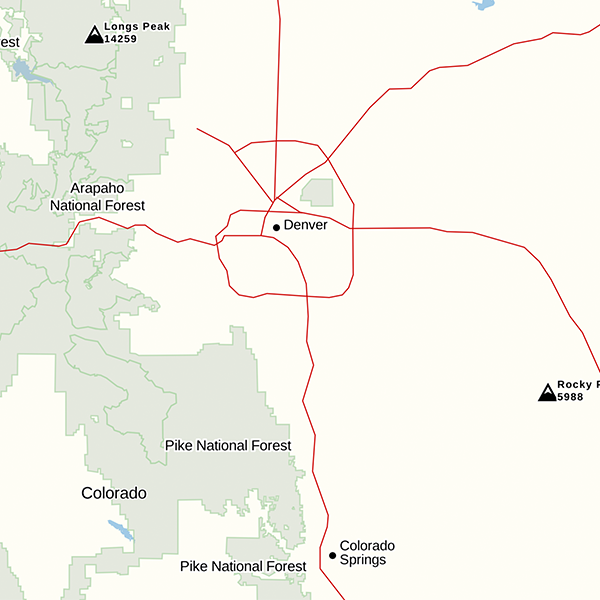
Get your bearings in cities, towns, and on the road with the new Gaia Streets map. The new map features more points of interest and amenity labels with less clutter, making it easy to pinpoint the places you want to go on the road. Use this map as a go-to for navigation and wayfinding through city downtowns, national park centers, and anywhere else the road takes you.

Find Restaurants, Shops, and Places Near You

With clearer labeling, fewer topo lines, and a softer color palette, the new Gaia Streets map helps you reach places more conveniently in your vehicle. Points of interest appear first when you zoom in and out on the map, highlighting the most critical information first. This makes planning national park visits easier, placing more emphasis on visitors centers, restrooms, and trailheads.

Orient yourself after spending multiple days on the trail by finding laundry, a hot meal, beers, or whatever else you’re craving on the map. New labels include restaurants, pubs, breweries, shops, grocery stores, transportation terminals, gear shops, parks, banks, and more.

While visiting a new city, explore the neighborhood parks, bike paths, and local trails or locate the train and bus terminals for upcoming travel. Additionally, plug Gaia GPS into CarPlay to discover surrounding businesses and points of interest right on the touchscreen of your dashboard.

Roadway Labeling

New designations appear over roadways, clearly identifying interstates, exit numbers, and road names. For example, quickly locate exits or frontage roads to avoid road closures or traffic along your route. Identify road types with color-coding: interstates in red, major roads in yellow, and streets in white.

How to Get Gaia Streets Map

Gaia Streets map is available to all Gaia GPS users. Download the Gaia Streets map by visiting the layers menu > Road Maps > Gaia Streets.

March 7, 2020
1 FacebookTwitterLinkedinRedditEmail
AndroidApp UpdatesGaia GPSHuntingiOSNew Maps

Easy to Read, Tiny to Download: The All New Gaia Topo

by Julien Friedland January 28, 2020
written by Julien Friedland

Today, we’re proud to announce the launch of one of our biggest projects yet. A combination of under-the-hood tech and visual design work, the all-new Gaia Topo combines world-class cartography with industry-leading download speeds and sizes.

Click here for instructions to access this map on iOS, the web, or in Android via the public beta.

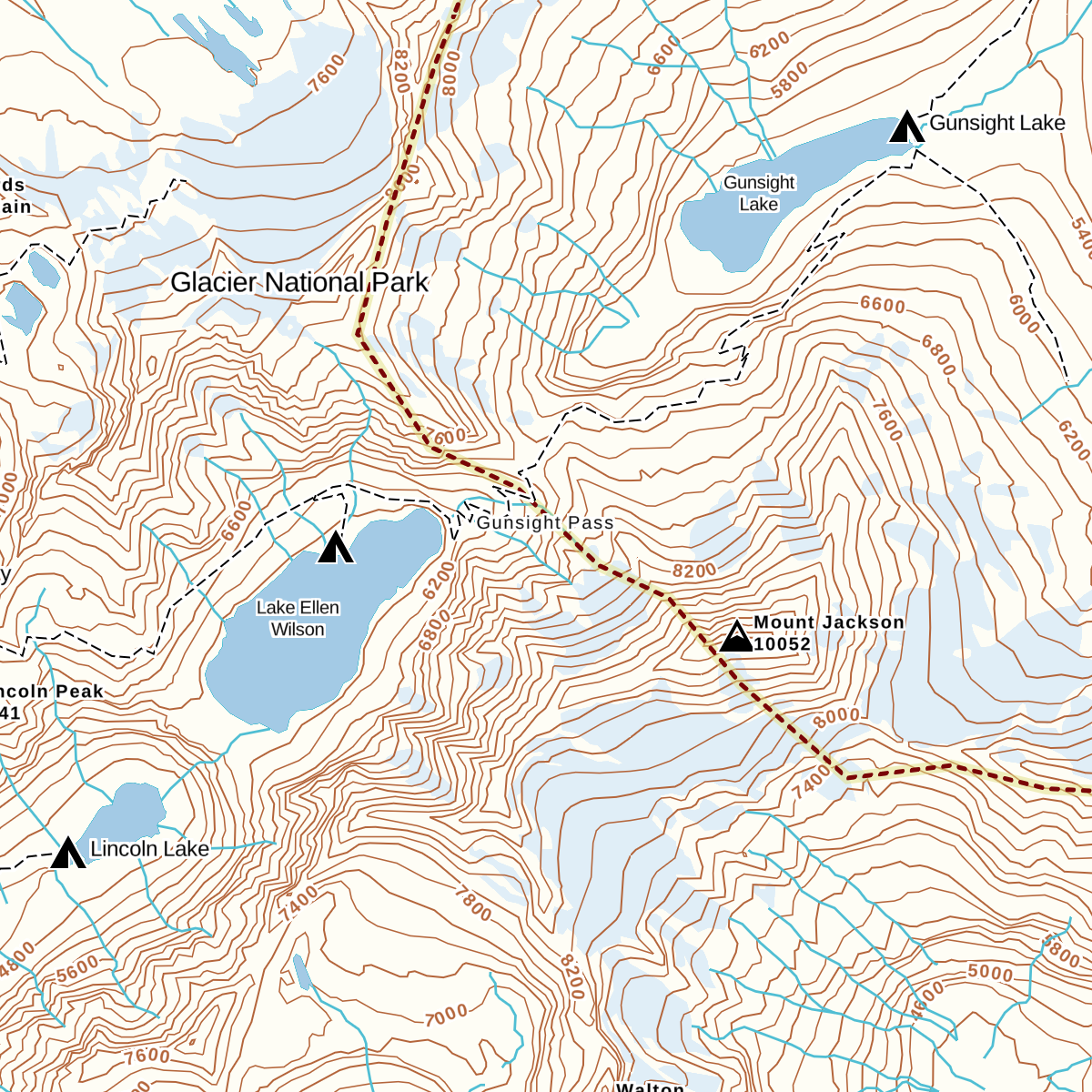
  • Gaia Topo before
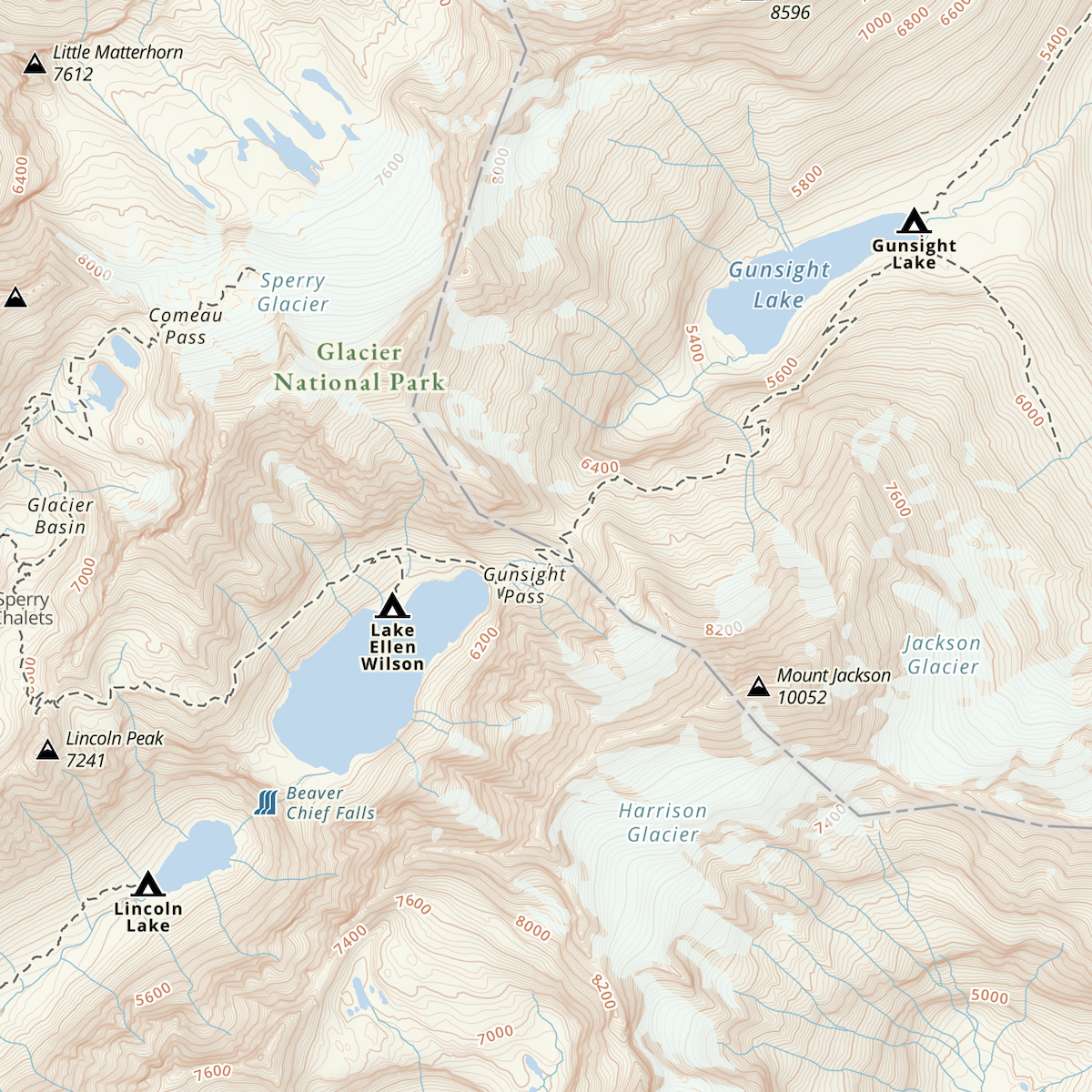
  • Gaia Topo after

World-Class Cartography

This project was driven by map-maker Lee France, who joined the Gaia GPS team this spring as the company’s first full-time cartographer. He brings over a decade of mapping experience to the new Gaia Topo, and early in his career, worked on some of the National Geographic Trails Illustrated Maps you can also access in Gaia GPS. You can read more about Lee’s background on the Gaia GPS team page.

The new Gaia Topo features a cleaner look and smarter labeling. That means it’s both easier to use and more beautiful to look at than ever before. We’ve tuned the map to the needs of many stripes of the outdoor adventurer. A new visual hierarchy system causes national and state parks, peaks, and campgrounds to appear first as you zoom in. We’ve also curated features and polished up the labeling system to improve information density. The result is a map that’s both more aesthetically pleasing and more efficient: It shows you exactly what you need at each zoom level without cluttering up your screen.

  • Water labels and contour line styling (before)
  • Water labels and contour line styling (now)
  • Road networks (before)
  • Road networks (after)

Road networks and main trails are now easier to find on the map. You’ll also find better hill-shading and toned-down landcover colors that don’t inhibit visibility.

Finally, we’ve improved contour line styling worldwide. Contour lines also appear sooner, making it easier to picture the terrain during large-scale route planning at low zoom levels. We also corrected a number of user-reported issues with the contour lines in various locations around the world.

Faster Downloads, Beautiful Rendering

With the new Gaia Topo, map downloads are faster and take up far less storage space, even though the new map has better data and styling.

To achieve that difference, we combed through all the data contained in Gaia Topo and eliminated redundant information, and did a neat trick to optimize how we packed each little map tile to be stored for offline use. This sort of optimization is something that defines R&D at Gaia GPS, and it’s what keeps our maps on the cutting edge of quality and download speed.

Download sizeDownload speed
AreaBefore updateAfter updateBefore updateAfter update
Yellowstone National Park63.8 MB28.8 MB1 min, 33 s33 s
Washington State1.34 GB470.8 MB28 min, 20 s9 min, 21 s
Great Smoky Mountains
National Park
42.2MB22.8 MB33 s24 s
Adirondack Park112.8 MB45.2 MB3 min, 19 s1 min, 8 s
Texas1.28 GB538.2 MB1 hr, 2 min20 min, 14 s

Comprehensive Geographic Information

The new Gaia Topo is more thorough and information-rich than ever before, thanks to an expanded roster of data sources. Gaia Topo pulls official government records, crowd-sourced OpenStreetMap information, and existing Gaia GPS data into a living map that constantly updates as new information becomes available.

In addition to comprehensive hiking and camping information, the new Gaia Topo highlights features specific to cyclists, thru-hikers, skiers, anglers, and other more niche categories of adventurer. You’ll find new icons for bicycle parking, ferry routes, beaches, dog parks, hot springs, forest service gates, fishing access points, and backcountry ski huts, to name a few. You can see all new icons in the Gaia Topo map legend.

We’ve also added more ski runs and cross country ski trails, styled to indicate trail difficulty. One-way trails are now marked with small arrow icons.

POI interest icons before the update(left) and after the update (right) ; Map data © OpenStreetMap contributors

How to Get the New Gaia Topo

Gaia Topo is the main map source in Gaia GPS, available to all Gaia GPS users—with or without a paid membership.

The new Gaia Topo is now available on iOS, the web, and in the latest beta test version of Gaia GPS for Android. To access it:

  • iOS: download the latest version of the Gaia GPS app for iOS
  • Android: download the latest version of the Gaia GPS app on Google Play
  • gaiagps.com – visit gaiagps.com/map.

If you had previously downloaded maps, you’ll see a notification offering to let you update your downloads.

Map data © OpenStreetMap contributors

January 28, 2020
4 FacebookTwitterLinkedinRedditEmail
Gaia GPSNew Maps

New Maps for New Zealand: Topo & Nautical Chart Maps

by Julien Friedland January 25, 2020
written by Julien Friedland

For those keen on a multi-sport adventure in New Zealand, Gaia GPS now offers detailed New Zealand topo maps of the North and South Islands. Beyond shores, Australia/NZ Nautical Chart maps provide coverage of surrounding islands and oceans.

An adventurer’s paradise, New Zealand’s North and South Islands offer every outdoor activity imaginable. In the North Island, surf coastal beaches, explore mystical scenery and hike through the volcanic landscape of the Tongariro Great Walk. Ride the ferry to the South Island to hike the ‘finest walk in the world’: the Milford Track. Then, lay some tracks on one of Queenstown’s ski resorts. If water is your preferred element, use the nautical maps to tour the Bay of Islands or hundreds of other surrounding harbors, coves, bays, and islands.

Included in New Zealand Topo:

Highly detailed and beautifully illustrated, New Zealand Topo maps cover the entire North and South Islands, offshore islands, and some of the Pacific Islands. Maps include hiking trails, huts, campsites, labeled bodies of water, and terrain features for planning backpacking routes and road trips.

About New Zealand Topo:

Topographic maps for New Zealand are provided by the Land Information New Zealand (LINZ) data service. LINZ maintains an up-to-date authoritative national record of the country’s topography including mountains, plains and rivers, and the roads and railways. LINZ provides topo maps for a variety of groups, including New Zealand emergency services.

Australia/New Zealand Nautical Charts

Tasmania nautical map displayed on iPhone interface with ocean background.

Included in Australia/NZ Nautical Charts:

Nautical charts for the Pacific Ocean cover the coast of New Zealand, the Tasman Sea, and the eastern coast of Australia, including parts of Southeast Asia and western North America.

About Australia/NZ Nautical Charts

Provided by Land Information New Zealand (LINZ), these charts are designed for planning and navigation in waters deeper than 200-meters. They include depth contours, magnetic variation curves, transoceanic cables, and approximate international boundaries.

Access New Zealand Topo and Nautical Charts

New Zealand Topo and Australia/NZ Nautical Charts are available to all Gaia GPS users including free users. To access New Zealand Topo and Australia/NZ Nautical Charts, visit the layers menu and view the Australia/New Zealand/Asia maps category. Select New Zealand Topo, Australia/NZ Nautical Charts, or choose from the list of other Australia maps available.

January 25, 2020
0 FacebookTwitterLinkedinRedditEmail
AdventuresGaia GPSNew Maps

South Australia Topo: Maps for Kangaroo Island, Flinders Range, the Coastline and More

by Julien Friedland December 16, 2019
written by Julien Friedland

Gaia GPS’s Australia map collection now includes South Australia Topo. For adventurers down under, this authoritative government-produced map unlocks five areas from the coast to the mountains. Dial in your South Australian route with detailed topo maps, road and track information, and key landmark notations.

What’s Included in South Australia Topo?

The South Australia Topo map includes full topographic coverage for Kangaroo Island, Flinders Range, Yorke Peninsula, Riverland & Murray Mallee, Mount Lofty Ranges, and Eyre Peninsula. Coverage extends along 3,800km of southern coast from the border of Western Australia to Victoria, and extends north to the Flinders Range.

Map details include topography, roads and tracks, buildings, and other landscape features. It also features a standard topographic map base, generated from databases maintained by South Australia’s Department of Land and Water and other state government agencies.

South Australia coastline with trees in the foreground.

About South Australia Topo

Australia’s official Government resource, Emergency Services Map Books provides the maps for South Australia Topo. Mapping scales include: 1:250k, 1:100k, 1:50k, and 1:25k. A combination of high and low resolution maps show the entire extent of coverage at every scale.

Multiple Australia maps already live in the Gaia GPS map catalog as part of Gaia GPS’s growing effort to provide maps for the entire country.

How to Access South Australia Topo in Gaia GPS

South Australia Topo maps are available for users with a Premium Membership. Gaia GPS users of all levels have access to other Australia and New Zealand maps that can all be found here.

To add the South Australia map to your collection, visit the layers menu and view the Australia/New Zealand/Asia maps category. Select South Australia Topo or choose from the list of other Australia maps available.

December 16, 2019
0 FacebookTwitterLinkedinRedditEmail
New Features

New and Powerful Mapping Tools on gaiagps.com to Plan Your Next Adventure

by Julien Friedland December 12, 2019
written by Julien Friedland

Get an intuitive, customizable mapping experience when you use the main map on gaiagps.com. We’ve spent the past year rebuilding the web map from scratch to bring you the fastest, most seamless experience while using gaiagps.com

The redesigned map offers intuitive route building, lightning-fast searching, and advanced map printing tools. Build and label routes faster with new waypoint and route options. Gather more details from the map by clicking points of interest to learn about hike metrics, campsite details and more.

Try it now by visiting the main map or read on to learn more.

Quickly Manage Maps and Find Legends

All map tools now live in one clean interface, making them easy to access, switch between, and view while looking at the map.

  • Map controls (zoom, location, layers & overlays, print, waypoint, and create route) and Map Layers menu now appear on the left side of the map and won’t obscure your view.
  • Quickly look up a map’s legend by clicking on the map source in the menu. The legend for each map layer will appear in the sidebar.
  • Added support for maps in vector format when available. Vector maps provide smoother zooming, better resolution, and support for a richer (more interactive) experience in the future.
  • Map Overlays (waypoints, public tracks, & grids) now appear at the top of the Map Layers menu instead of the bottom, so you can more quickly customize your view.
A comparison of two computer screens with old map menu in the right corner compared to the new map menu in the left side bar.

Interactive Map Details

Now you can click items directly on the map to get information about them. Learn about hikes, natural features, property boundaries, and other important landmarks.

  • Click hiking trails to learn more about distance, elevation gain and estimated time.
  • Discover campground information like fee requirements and the number of sites.
  • Click a point of interest — like a trailhead or meeting point — then copy the URL and share with friends.
  • Select natural features to learn about nearby hikes.
  • Expand public and private land boundaries for ownership information.
Point of interest icon including description of Duwee falls with link to nearby hikes.

Lightning Fast Search

The improved search bar makes finding hikes, parks, and points of interest blazing fast.

  • Search results start appearing 10x faster.
  • Results are more accurate and include a larger amount of hikes, points of interest, and parks than before
  • You can also search and save coordinates in multiple formats directly from here.
Comparison of two computer screens showing the old search bar and menu in the top of the top bar vs the left hand bar.

Customize Your Waypoints

Now you can view the details for, and quickly customize any number of waypoints directly on the map when you click on it.

  • Select a new or existing waypoint to make edits.
  • Customize your waypoint name and description.
  • Select from an expanded list of custom waypoint icons.
Screen featuring the Gaia GPS main map with new waypoint icons available.

Route Planning Improvements

Many Gaia GPS users prefer to build their snap-to-trail routes on gaiagps.com before saving them to their phone for use in the field, so we’ve made online route planning faster and easier.

  • Create out-and-back routes with overlapping route segments.
  • Build snap-to-trail routes faster.
  • Routes now have arrows indicating the direction of travel.
  • More accurate elevation profile now appears on the bottom of the screen instead of the sidebar, and is opaque – preserving screen real-estate for route planning.
Screen featuring a highlighted route on the main map with directional arrows.

Customize, Adjust, and Export Printed Maps

The new print preview screen allows you to customize paper maps with more fine-tuning options.

  • Quickly create and adjust selections before printing.
  • Ensure the entire route is captured in the print preview screen.
  • All maps include an improved magnetic declination indicator.
  • Export as a PDF and print in a higher resolution.
Two screens showing a comparison of the new versus old print preview screen. New print preview shows entire map selection and mock-up of paper map.

The Gaia GPS map team of three engineers dedicated the last nine months to overhauling gaiagps.com, with more features coming soon, too. We’ll be able to implement new features and updates faster with the improvements that we’ve already made. Upcoming projects include: improving how you manage saved data on the map, how you search and find hikes, and how you work with the map menu.

The updates to the main map aim to improve every step of your online map browsing and building experience. Try it now by opening gaiagps.com, selecting points of interest, building a route and printing the route. Test out the map and let us know what you think.

December 12, 2019
0 FacebookTwitterLinkedinRedditEmail
HikesNew Maps

Complete National Geographic Pacific Crest Trail Maps Now Available in Gaia GPS

by Julien Friedland November 22, 2019
written by Julien Friedland

Now, you can hike the Pacific Crest Trail with digital maps born of a partnership between National Geographic Maps and Halfmile.

In 2017, National Geographic teamed up with thru-hiker and mapmaker Lon “Halfmile” Cooper to produce maps that included both NatGeo’s meticulous cartography and Halfmile’s firsthand notes and insider information. The result contains careful annotations about trail mileages, official and unofficial campsites, water sources, and other points of interest.

Gaia GPS started converting and uploading those maps this spring, adding first Washington, then Oregon. Now, we’ve reached the finish line with one final push to add the entirety of the trail through California. (National Geographic has also released the PCT California maps in print.)

About the PCT in California

For most thru-hikers, the journey starts in California. North bounders hikers toe the Mexican border, then set off through Campo and into the Laguna Mountains and the stark beauty of the Southern California desert. The following sections of trail contain some of the most iconic landmarks along the entire PCT. Think giant sequoias, the granite monoliths of Yosemite National Park, and 14,491-foot Mount Whitney, the highest point in the Lower 48.

In total, California holds 1,692 miles of the PCT—over half the trail. Whether you’re out to hike the whole thing, hunting for your next big backpacking adventure, or scouting scenic day hikes near Los Angeles or Sacramento, the NatGeo Pacific Crest Trail map layer has everything you need to plan and execute a smooth trip.

How to Use the NatGeo Pacific Crest Trail Map Layer

You can access the NatGeo Pacific Crest Trail map layer—in addition to weather forecasts, wildfire overlays, and other premium maps—with a Gaia GPS Premium Membership.

To access the map layer, follow these steps:

  1. First, download the Gaia GPS app. It’s available on the App Store for iOS devices and on the Google Play Store for Android devices.
  2. Open up the Map Manager. Go to United States > NatGeo Pacific Crest Trail, and tap the green plus-sign to add it to your main map.
  3. Scroll across the main map to find your upcoming section of trail. Then, download maps for offline use.
November 22, 2019
0 FacebookTwitterLinkedinRedditEmail
AndroidApp UpdatesiOSNew Maps

New ATV and Snowmobile Trail Overlays from Backroad Mapbooks

by Julien Friedland November 21, 2019
written by Julien Friedland

Snowmobile trails (left) and ATV trails (right)

Known for its remote wilderness, deep winters, and endless backroads, Canada offers a trail for every type of adventurer. Now, thanks to Backroad Mapbooks (BRMB), snowmobilers and ATVers can access over 150k miles of trail maps using Gaia GPS. Color-coded trails make it easy to distinguish which trails allow your vehicle for quick planning and navigating.

This addition to Gaia GPS’s growing catalog of Canada maps allows ATVers and snowmobilers to plan the best routes using a powerful collection of over 25 overlays.

ATV and Snowmobile Trail Overlays

The BRMB ATV Trails overlay includes 69,000 miles of trails across Canada for ATVs, OHVs (Off-Highway Vehicles), motorcycles, and four-wheel-drive vehicles. The BRMB Snowmobile Trails overlay includes 90,000 miles of snowmobile trails across Canada, from BC to Newfoundland.

Color-coded trails make it easy to distinguish from multi-use, ATV and snowmobile trails. Like all Gaia GPS overlays, the ATV and Snowmobile overlays have an adjustable transparency, according to your preference.

Adjust overlay transparency

Whether you’re exploring the powder fields of British Colombia or ATVing the remote Rocky Mountain Foothills of Alberta, download these two overlays to discover new trails, pinpoint your location, and always be prepared.

Access Gaia GPS’s Full Canada Catalog

The two new layers are part of Gaia GPS’s growing catalog of Canada and BRMB Adventure overlays including; Canada Topo, BRMB Base Layer, BRMB Multi-Use trails, Wildfires and Timber Harvest overlays. Be sure to try them out and stay tuned for more updates coming from Gaia GPS and BRMB soon.

You can also read more on Snowmobile and ATV Trails overlays on the BRMB blog.

November 21, 2019
0 FacebookTwitterLinkedinRedditEmail
AdventuresCompany NewsGaia GPS

Gaia GPS Welcomes 7 New Team Members

by Julien Friedland November 19, 2019
written by Julien Friedland

Today, we’re thrilled to introduce you to the seven newest members of the Gaia GPS team. Gaia GPS now includes 22 full-timers working on coding, design, cartography, marketing, and customer support, fully remote and distributed across the US.

It’s important that all the Gaia GPS team members are fueled by an adventurous spirit. As you’ll see below, these new folks have collectively amassed thousands of miles of exploration on foot, via bike, across open water, and in the saddle of an ATV. The team at Gaia GPS is an extension of the overall user community, and that helps keep the right focuses on new features, new maps, great user experience, and top-notch customer support.

These seven represent just the beginning of the company’s biggest round of expansion yet. If you’re interested in joining the team, click here to view our current openings and apply. We’re steadily hiring about 1 person per month.

Laura Friedland

Marketing Specialist

Favorite outdoor memory: I recently rode my bicycle from Medellín, Colombia, to the southern tip of Chile. Of the hundreds of sunsets along the way, my favorite was in Bolivia, on Salar de Uyuni—the biggest salt flat in the world. The only issue was the ~40mph winds. After three days on the salt flat, all my tent stakes were bent in half!

Proudest professional accomplishment: I teamed up with Katadyn USA and William Woodward (@wheretowillie) to create a short film about access to clean drinking water in the outdoors.

Recipe for the perfect s’more: It’s all about how you get the marshmallow off the stick. You have to clamp your stick between your knees and use two hands to sandwich the mallow between your graham crackers and chocolate. Then, you seamlessly twist the mallow off the stick into a perfect s’more. It’s a clean job every time.

Peter Liu

Software Engineer III

Favorite outdoor memory: At Þingvellir in Iceland, I walked between these two short cliffs. Turns out it was where the Eurasian and North American tectonic plates meet, and one of the only parts of that not underwater.

Proudest professional accomplishment? A few years back I built an app to help low-income housing seekers explore new neighborhoods and presented it at the Obama White House.

Recipe for the perfect s’more: I’m pretty impatient so I just eat the marshmallows raw. Like a peasant.

Melanie Wilson

Customer Support Specialist

Favorite outdoor memory: My first solo backpacking trip sleeping on the banks of Loch Avon in the Cairngorm Mountains in Scotland.

Proudest professional accomplishment:
In my previous job as a librarian, I launched a collection of circulating hotspots and tablets. This collection helped reduced the negative impact of the digital divide in Lake County, Ohio, and it allowed students without internet access to complete schoolwork at home.

Recipe for the perfect s’more:
I like a s’more with a little spice so instead of the standard Hershey’s chocolate I add chocolate with chilies.

Matt Palmer

UX/UI Designer


Favorite outdoor memory:
A 1.5-week, self-supported bikepacking trip from Orange County, California, to Hetch Hetchy, mostly following the California Aqueduct. I had to lift my 80 pounds of bike and gear over about 80 gates, but it was worth it.

Proudest professional accomplishment: As a passion project during my time at ESRI, a friend and I collected anonymous Strava data to discover places where people were stopping on-trail. Land managers could then look at the data and identify those places as spots in need of better signage, benches for resting, or trail maintenance to fix obstacles.

Recipe for the perfect s’more:
On my list to try: Some spicy cayenne dark chocolate and a cinnamon graham combo.

Adam Tootle

Software Engineer II

Favorite outdoor memory: As an anniversary gift, my wife surprised me during a trip to Mexico with an ATV tour through the Baja California Desert. None of the other scheduled riders showed up, so we ended up with a private tour. It was an amazing experience.

Proudest professional accomplishment: In the years I worked on health and wellness products, I loved receiving feedback from people who had just hit a new personal record for daily steps, or just trained for their first marathon. Building tools to help people improve their health and potentially live longer is something I’ll always be proud of.

Recipe for the perfect s’more:
The only thing I’m a stickler about is how roasted the marshmallow is. Never let the marshmallow catch on fire. You have to know how to get the marshmallow right up to catch-fire level without going too far.

Jay Crooker

Customer Support Specialist


Favorite outdoor memory:
Qualifying for (and competing in) the Ironman Triathlon World Championships in Kona, Hawai’i, in 1997.

Proudest professional accomplishment: Surviving my doctoral defense for my PhD in Analytical Chemistry.

Recipe for the perfect s’more:
Heath Bar instead of chocolate. You’re welcome.

Jim Margolis

Customer Support Specialist

Favorite outdoor memory: I climbed Pingora, a peak in Wyoming’s Wind River Range, with my mother and the Grand Teton with my father. I’m close with my parents, and those adventures have been very special to me.

Proudest professional accomplishment: I’ve spent over 150 field weeks as an instructor at NOLS (National Outdoor Leadership School) teaching climbing, mountaineering, winter, and backpacking courses.

Recipe for the perfect s’more:
I put the marshmallow on a stick and prop it about six inches from the fire until it browns. While I’m waiting, I put the chocolate on a graham cracker nearby to melt it. Once the marshmallow is ready, I use the two grahams to pull it off the stick. Really the only advanced thing I do is stuff the whole thing in my mouth at once!


Learn more about Gaia GPS’s newest employees and meet the rest of our team at gaiagps.com/company.

Still Hiring—Apply Today!

Gaia GPS is still growing. If you’re smart, motivated, and passionate about the outdoors, consider applying for a career focused on getting more people outside, and helping them stay safer every time they do. Keep an eye on the latest job postings at the Gaia GPS careers page.

November 19, 2019
0 FacebookTwitterLinkedinRedditEmail
AndroidApp UpdatesGaia GPSHow-ToHuntingiOSNew FeaturesNewsletter

Customize Paper Maps with Gaia GPS

by Julien Friedland October 15, 2019
written by Julien Friedland

Customize paper maps using the new print preview screen on gaiagps.com. Now you can quickly create and adjust selections before printing and be sure that your entire route is captured and easy to read. Additionally, maps can be exported as PDFs and will print in a higher resolution with a more reliable magnetic declination indicator.

Easily Adjust Map Orientation and Size

The new printing interface allows you to see an exact mock-up of the printed map, making it easy to fine-tune your preferred orientation, and size. New border parameters enable you to click and drag the map and zoom in and out to fit the selection of your customized paper map.

Orientation: Toggle between landscape and portrait to view which orientation best fits the map selection. Swapping between different views requires fewer adjustments and makes it easy to see which orientation will be easiest to read when you’re holding the map on route.

Sizing: Choose from six printing size options ranging from letter size (8.5×11) to A2 (16.5×24). Measurements for each map size appear when making a selection, for quick reference.

New Magnetic Declination Indicator

The magnetic declination indicator has been updated to consistently appear on printed maps, no matter how close to zero your magnetic declination is. This means you can always adjust your compass to increase your accuracy while navigating.

Better Resolution and Attribution

Printed maps will now print at a higher DPI and slightly better resolution. Attribution also appears in the bottom left corner of every map, clearly defining the source of the maps data.

Learn More

To access the new print preview screen, head over to the main map at gaiagps.com. To learn more about how to print your maps –including tips on layering and adding gridlines— visit the print maps online blog post or the help center.

October 15, 2019
0 FacebookTwitterLinkedinRedditEmail
Gaia GPSNew Features

Use Coordinates to Save Waypoints on gaiagps.com

by Julien Friedland September 16, 2019
written by Julien Friedland

Search and save coordinates as waypoints on gaiagps.com. If you need to paste in coordinates from another website or type in coordinates from one of your paper maps, gaiagps.com now has you covered.

This feature is useful for all sorts of Gaia GPS users, from casual hikers to search & rescue personnel.

Now, if you paste or type in coordinates in the search box, that will both center the map, and let you save the location as a waypoint if you wish. Coordinates are recognized in many formats allowing you to easily plug in your desired locations.

The mobile app (for iOS/Android) has always allowed you to both tap the map and manually enter coordinates, and now you can do the same on the website.

Here’s an example of how to save a waypoint using UTM coordinates.

Using coordinates to make waypoints was one of the most requested features on our forums. After launching an improved version of the main map, building this feature was the next update we wanted to make. Thank you for helping us improve Gaia GPS with your feedback.

Test out the new feature and overall map page and let us know what you think.

Try it Now

For more detailed instructions and the most up-to-date information on using coordinates to save waypoints with Gaia GPS, read this help article.

September 16, 2019
0 FacebookTwitterLinkedinRedditEmail
Load More Posts

Categories

  • Adventures
  • Android
  • App Comparisons
  • App Updates
  • Backcountry Skiing
  • Boating
  • Company News
  • Emergency Response
  • Featured
  • Fishing
  • Gaia GPS
  • Gaia GPS Offroad Podcast
  • GaiaCloud
  • Hikes
  • How-To
  • Hunting
  • iOS
  • New Features
  • New Maps
  • Newsletter
  • Offroading
  • Out and Back Podcast
  • Overlanding
  • User Profiles

Recent Posts

  • Trip Report: A Rider’s Guide to Bikepacking in Bears Ears National Monument
  • How to Hike a Colorado 14er: A Step-by-Step Guide with Gaia GPS
  • Trip Report: A Rider’s Guide to link Boulder and Steamboat Springs
  • Trip Report: A Rider’s Guide to the South Platte’s Best Trails and Roads
    • Facebook
    • Twitter
    • Instagram
    • Youtube
    • RSS
    • Explore The Map
    • Get the App
    • Upgrade Today
    • Explore The Map Catalog
    • New Features
      • Gaia GPS

        The Hike Map That Broke Me: How Gaia…

        April 24, 2025

        Gaia GPS

        Introducing the Gaia Hike Map: Plan Your Hike,…

        March 18, 2025

        Gaia GPS

        Unlock a New Level of Personalization in Gaia…

        December 12, 2024

        Gaia GPS

        Goodbye Clutter, Hello Streamlined Maps: Introducing Sync to…

        November 26, 2024

        Gaia GPS

        Discover Prime Stargazing Locations with Our New Light…

        August 15, 2024

        Gaia GPS

        2023 Mapped: Our Best New Features of the…

        December 27, 2023

        Gaia GPS

        Discover Adventure Easier Than Ever with New Map…

        July 27, 2023

      • New Maps
        • Gaia GPS

          Introducing the Gaia Hike Map: Plan Your Hike,…

          March 18, 2025

          Gaia GPS

          Discover Prime Stargazing Locations with Our New Light…

          August 15, 2024

          Gaia GPS

          Find Prime Viewing for Total Solar Eclipse with…

          March 27, 2024

          Gaia GPS

          See the World More Clearly with New Gaia…

          May 18, 2023

          Gaia GPS

          Gaia Classic: The Only Map You’ll Ever Need?

          May 4, 2023

          Backcountry Skiing

          Find Backcountry Skiing in Gaia Winter Map

          January 11, 2023

          Gaia GPS

          Our Favorite New Maps and Features

          December 23, 2022

    • Activities
      • Backcountry Skiing
      • Boating
      • Emergency Response
      • Fishing
      • Offroading
    • Adventures
      • User Stories
    • Help

    @2024 - All Right Reserved. Gaia GPS


    Back To Top